Xero Payroll timesheets from hours you have already approved
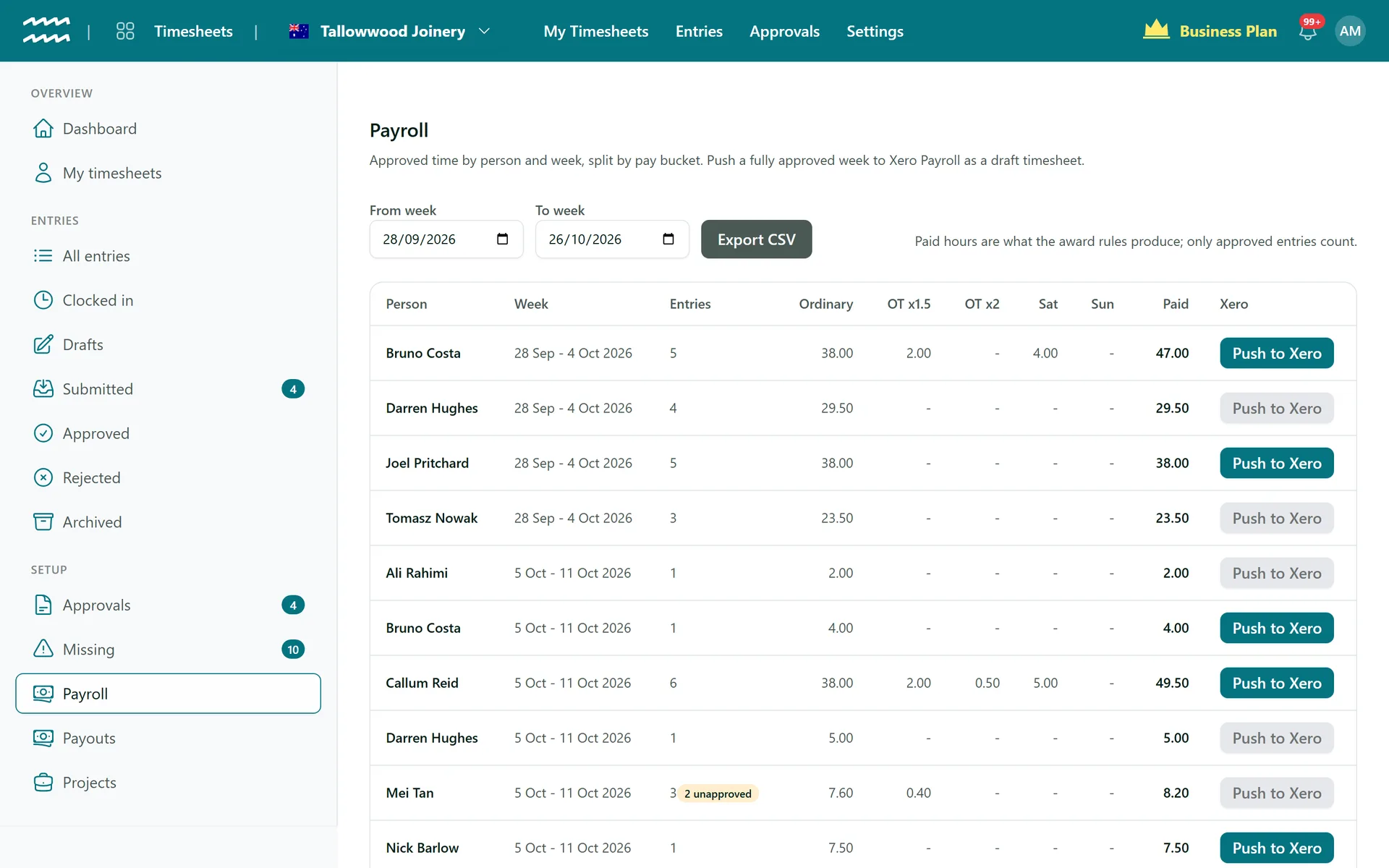
AirSign prepares the hours and Xero runs the pay. Approved time is split by the overtime and weekend rules you set, then sent to Xero Payroll as a draft timesheet for your payroll person to check.
Book a demoPart of the AirSign suite - one plan, every app.
From approved time to the pay run
Rules you set
Ordinary hours a day and a week, two overtime rates, Saturday and Sunday rates, rounding and a minimum shift, per engagement type.
Overnight shifts split
A shift past midnight is split at local midnight. Friday 10pm to Saturday 6am pays two hours as Friday and six at the Saturday rate.
Push to Xero
One draft timesheet per person per week, with a line for each bucket and the hours on the days they were worked.
CSV for anything else
The same breakdown exports as a CSV for another payroll system, with no Xero connection needed.
Contractor payouts
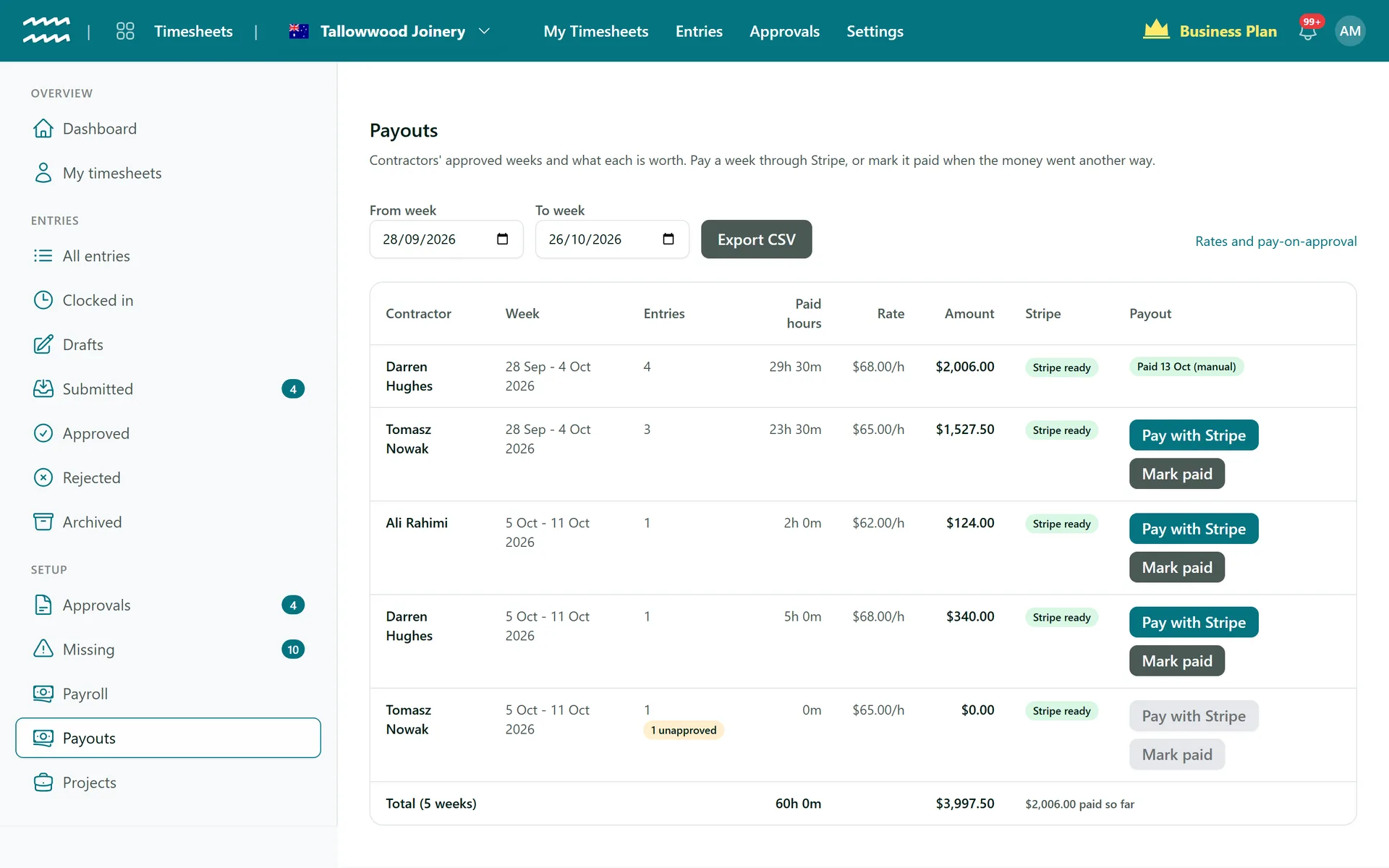
Set an hourly rate, then pay an ended, fully approved week through Stripe, or mark it paid with a reference.
Never paid both ways
A week that went to Xero cannot also be paid as a payout, and a paid entry cannot be pushed to Xero.
How to send a week to Xero Payroll
- 1
Set your rules
Under Settings > Timesheets, enter your ordinary hours, overtime and weekend rates.
- 2
Map Xero
In the Payroll section, pick the Xero connection, pay calendar and earnings rates, then match each person to their Xero employee.
- 3
Check the week
Open Payroll. Every entry in a week has to be approved before its Push to Xero button turns on.
- 4
Push and finish in Xero
Choose Push to Xero, then review the draft in Xero and run the pay there.
Contractors are paid separately
Employees go to payroll and contractors go to Payouts, decided by their active employment. A contractor sets up their own Stripe account under Get paid on their Home.
- A week can be paid once it has ended and every entry is approved
- Hours approved later show as a Top up on the same week
- Pay automatically once the last entry is approved, or pay each week by hand
More in AirSign Staff Management
Staff Rostering
A roster that flags clashes, gaps and missing licences as you build it.
Learn moreOnline Timesheets
Clock in, breaks and approvals, with hours that cannot overlap.
Learn moreEmployee Records
One record per person, with what they do and what they hold.
Learn moreStaff Compliance Tracking
Licences, checks and agreements tracked through to expiry.
Learn moreEmployee Self Service
Shifts, hours, leave and documents in a phone browser.
Learn moreXero Payroll Timesheets FAQs
No. It sends timesheets to Xero, which calculates and pays the wages. AirSign does not produce payslips, pay employees, withhold tax or pay super, and the Payroll page shows hours rather than dollars.
No, you enter the rules yourself and there are no pre-built award packs. They cover ordinary hours, two overtime rates and Saturday and Sunday rates. Public holiday rates, meal breaks and broken shifts are not worked out, so check those in your payroll system.
Xero Payroll AU only, on a weekly calendar starting Monday. Each person's week is pushed on its own row, so a fortnightly or monthly calendar will not match the dates.
Unapprove the entry, fix it and approve it again, then choose Push again. That creates a new draft in Xero, and you delete the old one there.
No, Xero Payroll is the only direct connection. For anything else, use Export CSV on the Payroll page.
Your organisation connects Stripe under Settings > Finance, you turn on Stripe payouts and set each contractor's hourly rate, and the contractor finishes their own Stripe setup. Money is paid from your Stripe balance, so a refused payment shows as Failed with a Retry button.
AirSign Staff Management is part of the AirSign suite - one plan, every app. Book a demo and we will walk you through it.
Run your workforce from one place
Book a demo and see your roster, timesheets and compliance working together.