Employee records that show what each person holds
Give every employee, contractor and volunteer one record. Their roles decide what they must hold, so the record shows what is on file, what is missing and what has been sent.
Book a demoPart of the AirSign suite - one plan, every app.
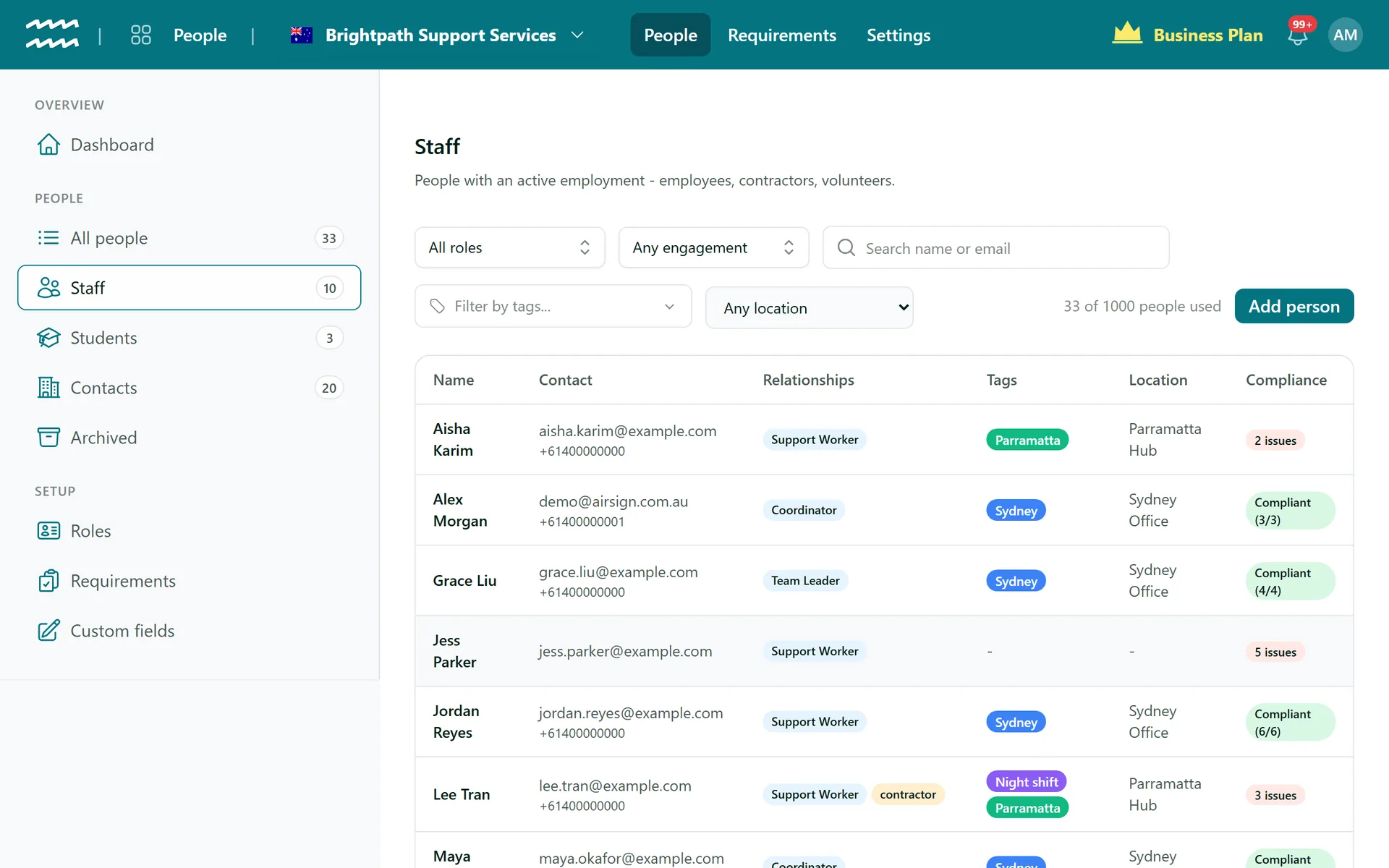
Everything about a person, in one place
One person, many relationships
Someone can be staff, a learner and a customer contact at once, without a second record.
Requirements that follow the role
Set rules by role, engagement type, location or tag, and they apply to everyone who matches.
Onboarding that sends itself
Add a person and the documents, forms and training they are missing go out automatically.
Leave balances
The Staff tab shows annual and sick leave in hours, accrued from approved timesheets, with opening balances from payroll.
Custom fields
Add your own fields, such as an NDIS number or licence class, to every person.
Notes and files
Keep a resume, a letter or a photo on the record, along with a timeline of notes.
How to add someone to your records
- 1
Create your roles
Open Roles and choose Add role for each position you employ.
- 2
Add the person
Choose Add person, enter their details, and add the employment they start with and its roles.
- 3
Define what they must hold
Under Requirements, choose Add requirement and say who it applies to.
- 4
Catch up the rest
For a new rule, Send to everyone missing shows how many will go out before anything is sent.
A checklist on every person
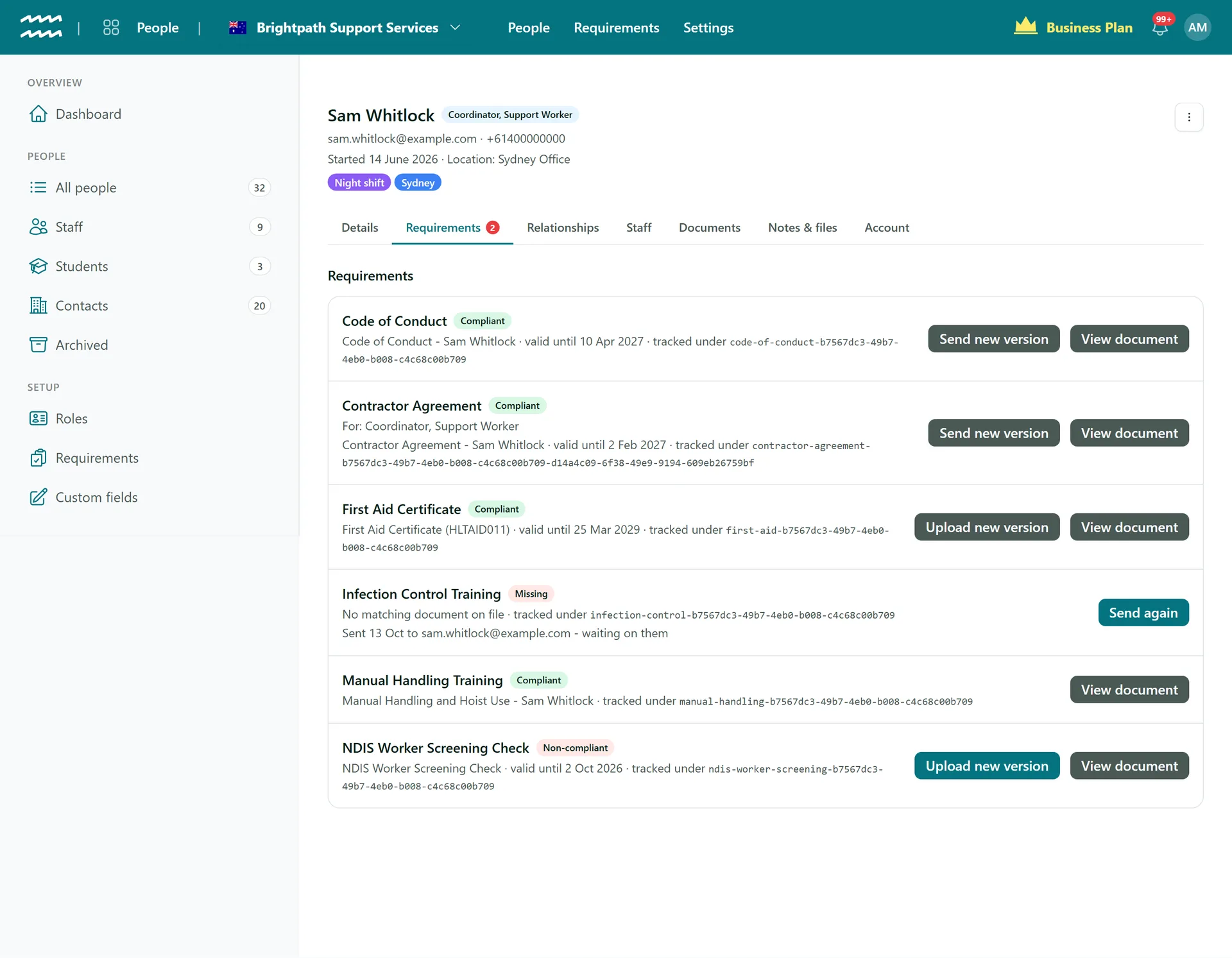
The Requirements tab lists each rule that applies to them, what is on file and what is outstanding. A badge on the tab counts anything missing or lapsed.
- Send a document, or send a new version, from the row
- Upload a licence or certificate for them, with its expiry
- A sent item stays visible while you wait on them
More in AirSign Staff Management
Staff Rostering
A roster that flags clashes, gaps and missing licences as you build it.
Learn moreOnline Timesheets
Clock in, breaks and approvals, with hours that cannot overlap.
Learn moreXero Payroll Timesheets
Approved hours split into pay buckets and pushed to Xero as a draft.
Learn moreStaff Compliance Tracking
Licences, checks and agreements tracked through to expiry.
Learn moreEmployee Self Service
Shifts, hours, leave and documents in a phone browser.
Learn moreEmployee Records FAQs
No, there is no spreadsheet import, so people are added one at a time. If you are moving a large team across, talk to us at your demo.
No. You match each person to a Xero employee so timesheets can be pushed, but their details are not synced in either direction.
Archive them. Anyone with timesheets, shifts, documents or certificates cannot be deleted, so their history stays complete and they simply drop out of pickers.
Employees, unless they are marked casual. Contractors and volunteers accrue none. Balances are built from approved timesheets, so salaried staff who never record hours do not accrue. Long service leave, leave loading and cashing out are not covered.
No, one active person per email in an organisation. A person with no email at all is fine, but they cannot be sent documents.
AirSign Staff Management is part of the AirSign suite - one plan, every app. Book a demo and we will walk you through it.
Run your workforce from one place
Book a demo and see your roster, timesheets and compliance working together.