Staff rostering that checks the roster as you build it
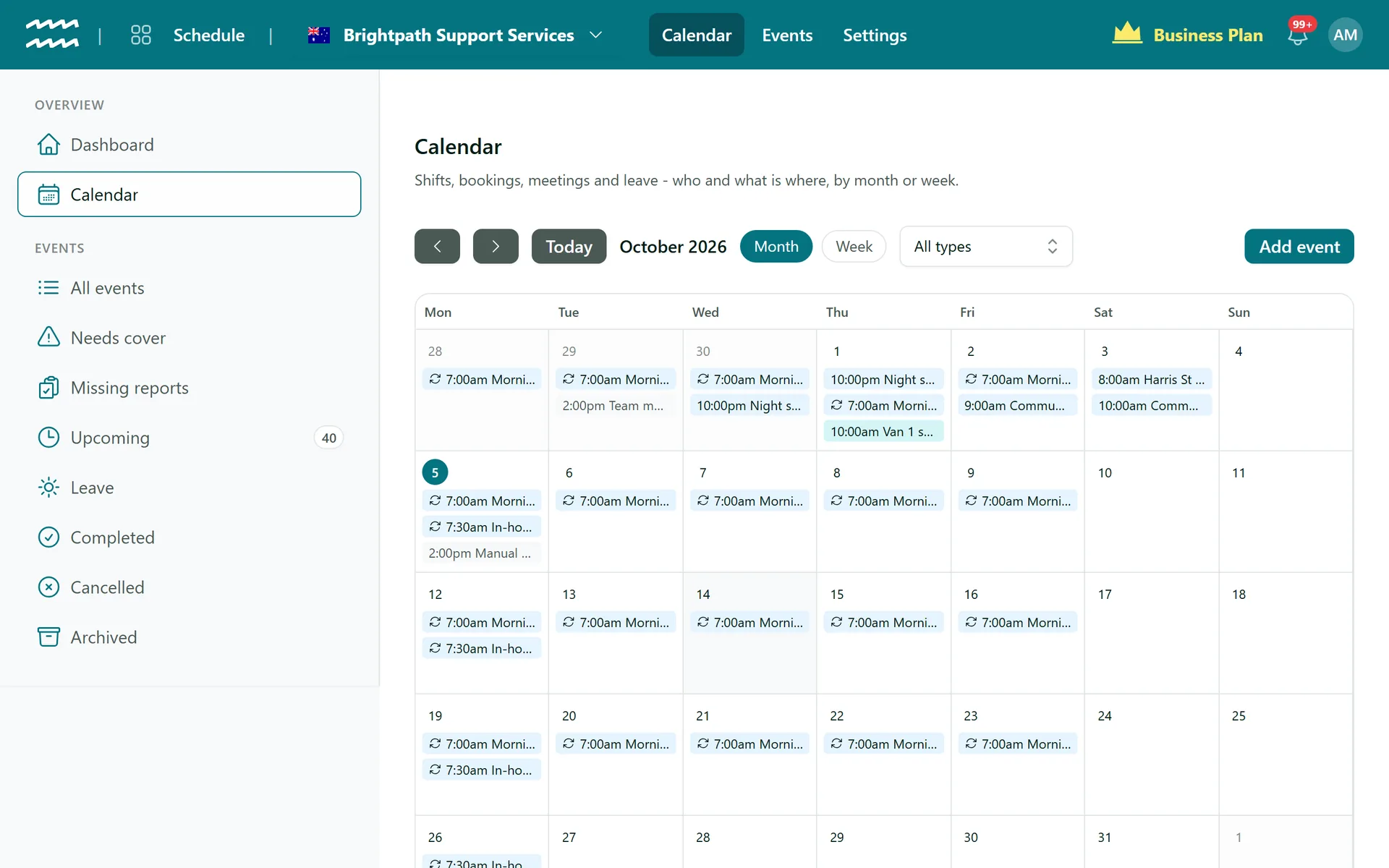
Put shifts, bookings, meetings and leave on one calendar. Choose a person and AirSign tells you straight away if they are double-booked, short a document or in the wrong role for the job.
Book a demoPart of the AirSign suite - one plan, every app.
What the roster does for you
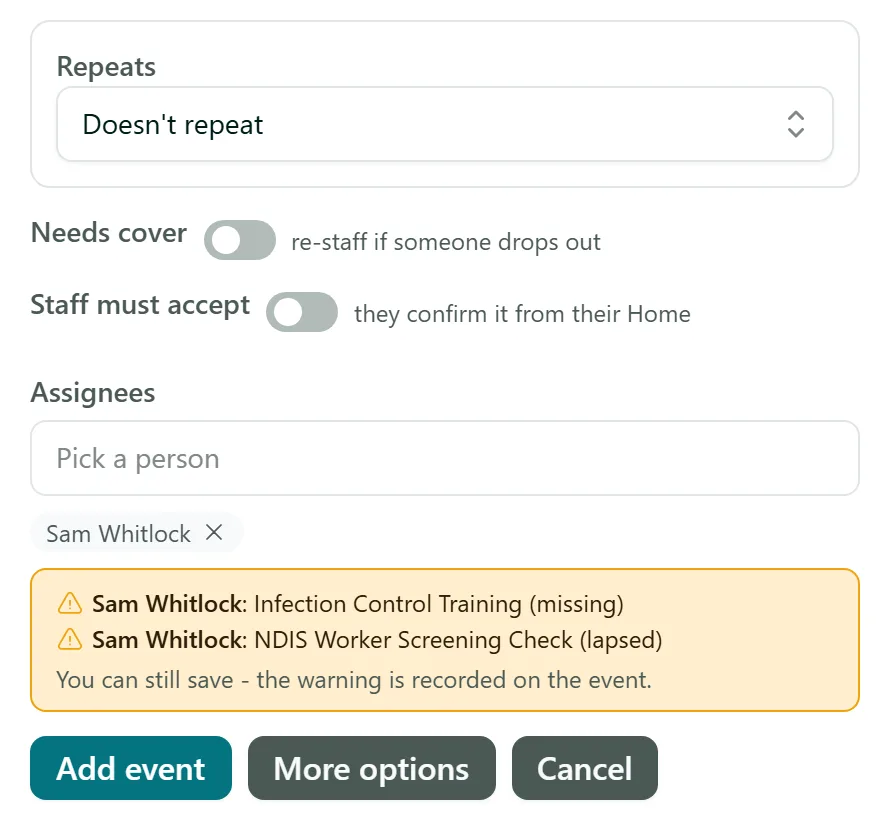
Warned before you save
Each person you add is checked for overlapping work, missing or lapsed requirements, and whether their role can deliver what the job bills.
Repeating shifts
Repeat a shift daily, weekly or monthly, then change one occurrence, that one and the following, or all of them.
Copy last week
In the week view, copy last week into this one as one-off shifts. Anything already there with the same title and start is skipped.
Cover when someone drops out
Find cover ranks your staff by role, compliance, clashes and site. Offer the shift and the first to accept takes it.
Open shifts
Open a shift to a role and let people apply for you to choose, or let the first one in take it.
Shift reports
Ask for a note or a form on each job. Missing reports lists what is overdue and who owes it.
How to build a roster in AirSign
- 1
Add an event
Open Calendar and choose Add event, or click a day. Pick a job type if you have one and it fills in the rest.
- 2
Choose your people
Search under Assignees. Any clash or missing document shows beneath their name while the form is still open.
- 3
Set the staffing rules
Turn on Needs cover to re-staff if someone drops out, and Staff must accept if they need to confirm it from their Home.
- 4
Fill the next week
Switch to Week and choose Copy last week, then adjust what has changed.
Warn, or refuse the save
Out of the box every check is a warning, because sometimes the overlap is deliberate. You decide which ones become hard stops.
- Block rostering people with missing or lapsed required documents
- Block rostering people whose roles cannot deliver what the job bills
- The same checks run on cover and open shifts, so they are not a way around it
More in AirSign Staff Management
Online Timesheets
Clock in, breaks and approvals, with hours that cannot overlap.
Learn moreXero Payroll Timesheets
Approved hours split into pay buckets and pushed to Xero as a draft.
Learn moreEmployee Records
One record per person, with what they do and what they hold.
Learn moreStaff Compliance Tracking
Licences, checks and agreements tracked through to expiry.
Learn moreEmployee Self Service
Shifts, hours, leave and documents in a phone browser.
Learn moreStaff Rostering FAQs
No, it warns you but never blocks it, because sharing a ute across two nearby jobs can be intentional. Compliance and role checks are different: an admin can turn those into hard blocks under Settings > Scheduling.
It appears on their Home and in the notification bell when they sign in. AirSign does not send a text, push notification or email for a rostered shift, and there is no publish step, so a saved shift is live.
Not directly. A worker can press Can't make it and the office offers the shift to someone else, or assigns them, from Find cover.
No. The calendar has month and week views, and you change a shift's time on the event itself. There is no day view yet either.
No to both. There is no calendar sync and no AI rostering. Find cover suggests people for a gap, but you make the choice.
AirSign Staff Management is part of the AirSign suite - one plan, every app. Book a demo and we will walk you through it.
Run your workforce from one place
Book a demo and see your roster, timesheets and compliance working together.