Staff compliance tracking for every licence, check and agreement
Signed agreements and uploaded certificates become records with an expiry date. You can see what is current, what is about to run out and who is missing something, and old versions stay on file.
Book a demoPart of the AirSign suite - one plan, every app.
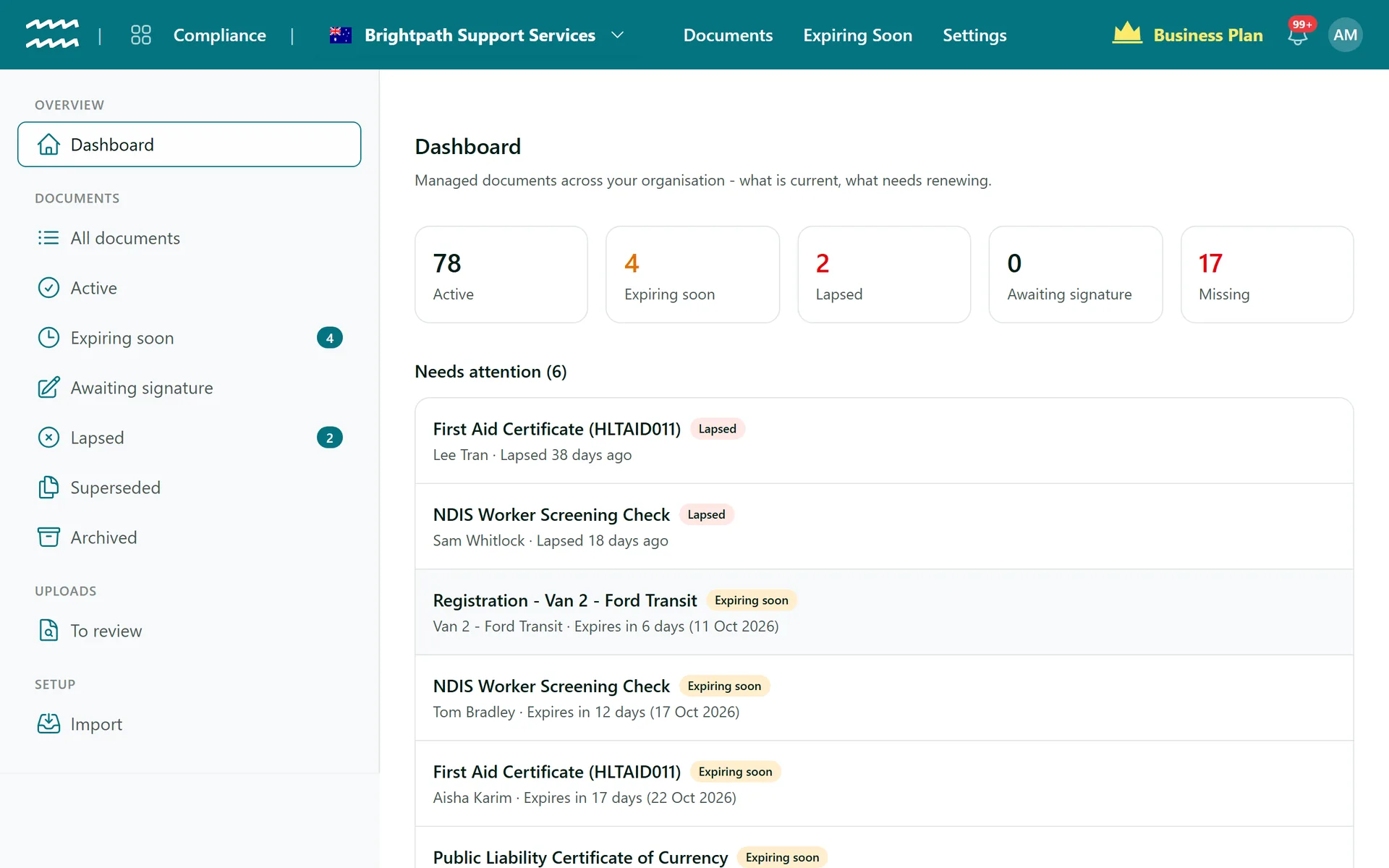
Know where you stand before an audit does
A dashboard of what needs doing
Active, Expiring soon, Lapsed, Awaiting signature and Missing, each one click away from the list behind it.
Reminders to your team
By default the record owner is emailed 60, 30 and 7 days before expiry, and again when it lapses.
Staff upload their own
A photo of a licence or a PDF certificate, with the expiry printed on it, from their Home.
Review uploads
To review lists anything that needs checking. Approve it, correct the expiry, or send it back with a reason.
Every version kept
A renewal is a new version. Earlier ones stay in History, and each can still be opened.
Re-sign or auto-renew
A document can expire and need signing again, or roll over each term until someone stops it.
How to start tracking staff compliance
- 1
Bring in what you have
Use Import to track past AirSign signing sessions, and Add external document for anything signed elsewhere.
- 2
Set your requirements
In People, add a requirement for each licence, check or agreement and say who needs it.
- 3
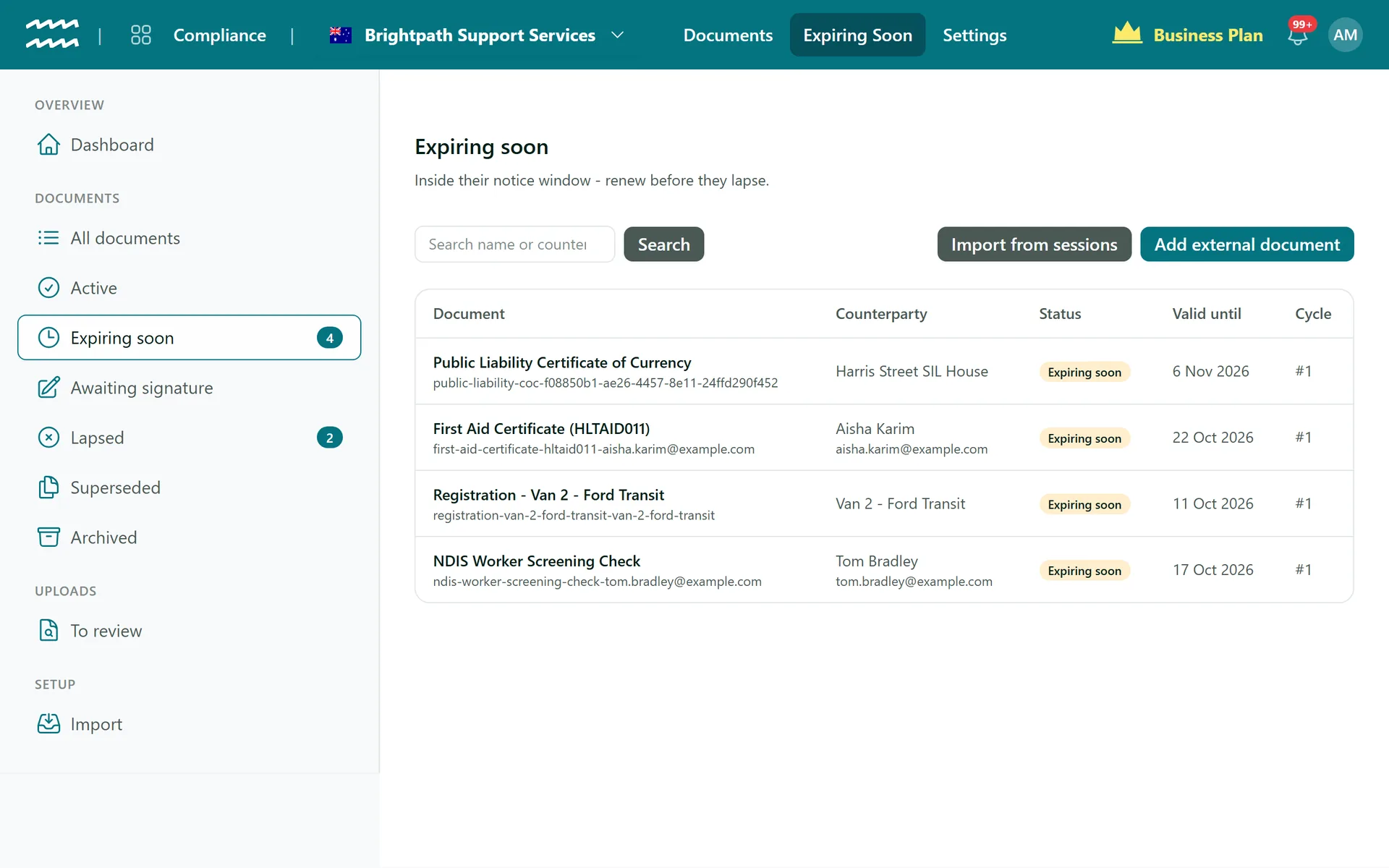
Work the expiring list
Open Expiring soon and choose Renew. AirSign creates a draft for you to check and send.
- 4
Clear uploads
Open To review to approve staff uploads, or reject them with a reason they will see.
Catch expiries before the roster does
A document inside its reminder window shows as Expiring soon straight away, on the dashboard and on the person's own checklist. After that it can flag or block them on the roster.
- A grace period can follow the expiry date
- Staff stay compliant while a new version waits for signature
- Lapsed requirements flow through to Schedule and its Find cover list
More in AirSign Staff Management
Staff Rostering
A roster that flags clashes, gaps and missing licences as you build it.
Learn moreOnline Timesheets
Clock in, breaks and approvals, with hours that cannot overlap.
Learn moreXero Payroll Timesheets
Approved hours split into pay buckets and pushed to Xero as a draft.
Learn moreEmployee Records
One record per person, with what they do and what they hold.
Learn moreEmployee Self Service
Shifts, hours, leave and documents in a phone browser.
Learn moreStaff Compliance Tracking FAQs
The person who created the record, or your organisation email if they cannot be found. The staff member does not get that email, though the item shows on their Home. Training and form records are the exception: those are sent back to the person automatically.
Renew makes a draft for you to send, and a document with required template details has to be sent from the template instead. Training, forms and requirements with a renewal cadence do go back out automatically.
No. There are no checks against government registers, and no OCR reading the dates, so someone types the expiry and a reviewer can check it. AirSign holds the evidence, it does not verify it.
Photos in JPEG, PNG or WebP, or a PDF, up to 5 files of 10 MB each. A requirement can limit that to one type, ask for no file at all, or leave the expiry optional or off.
No. Import covers completed AirSign sessions, up to 200 at a time. Documents from elsewhere are added one by one with Add external document.
AirSign Staff Management is part of the AirSign suite - one plan, every app. Book a demo and we will walk you through it.
Run your workforce from one place
Book a demo and see your roster, timesheets and compliance working together.