See which networks published and retry the ones that failed
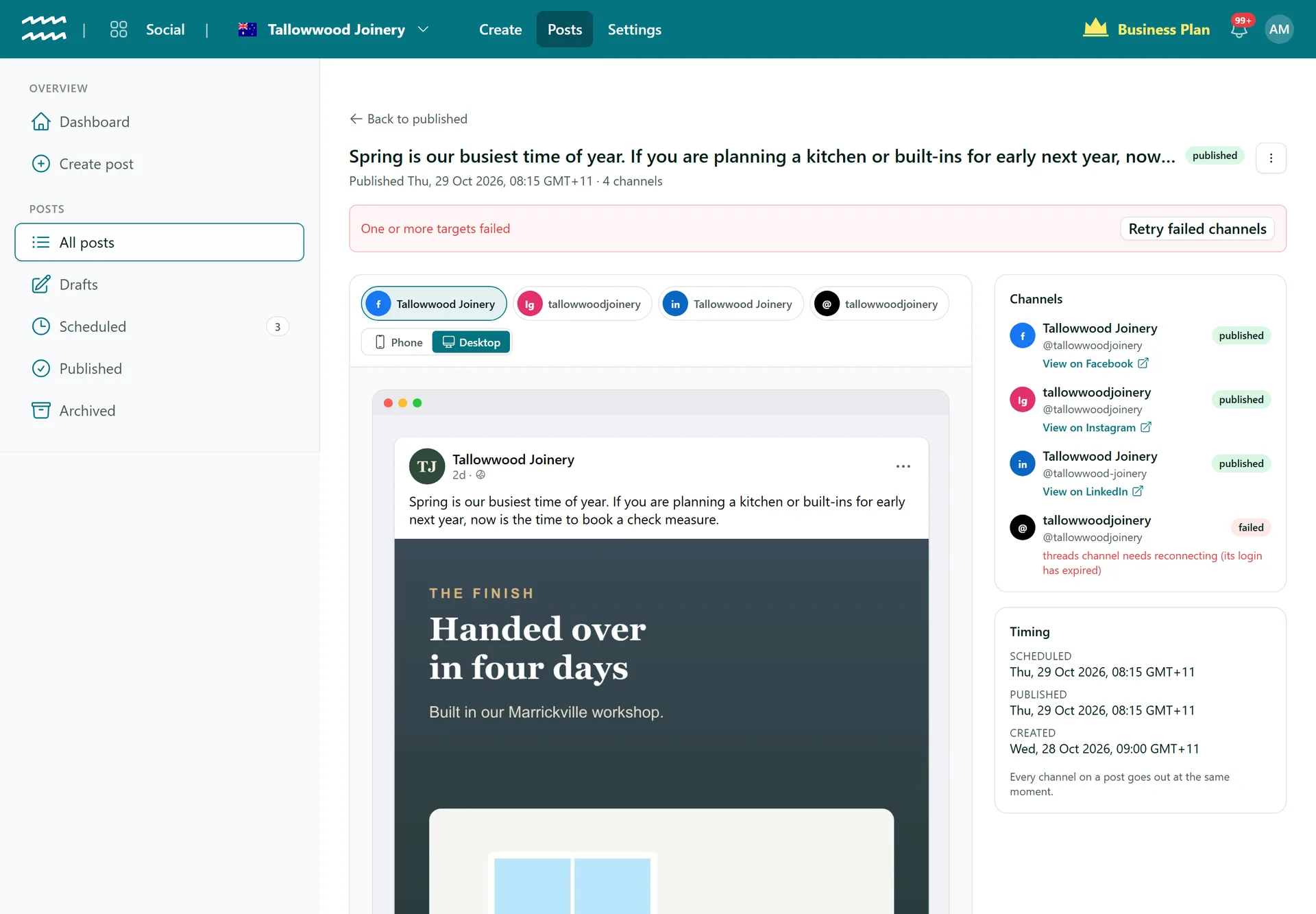
Every channel on a post has its own status, so one failed network never hides the others. See why it failed, reconnect the login if that was the cause, and retry only that channel.
Book a demoPart of the AirSign suite - one plan, every app.
Know what went out and fix what did not
Status per channel
Each channel shows scheduled, published or failed on its own, on the post and in your lists.
The reason it failed
The error sits under the channel, in plain view, rather than in a log.
Retry only what failed
Retry failed channels posts again to those channels. Channels that already published are not posted to twice.
Links to what went out
Published channels show a View on link, such as View on Facebook, where the network gives one.
Expired logins flagged
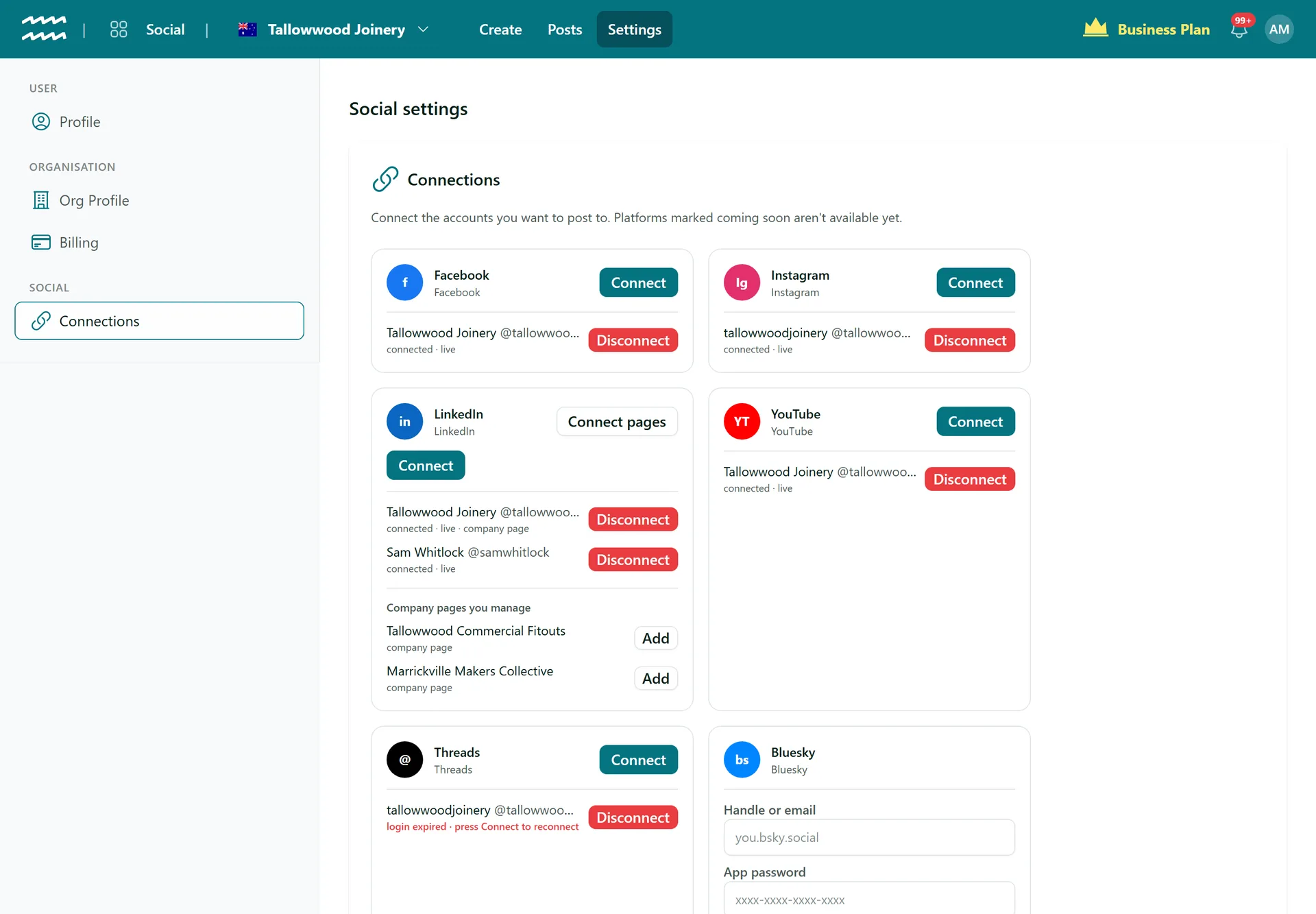
A rejected login marks the channel in Connections: login expired, press Connect to reconnect.
Reconnect in place
Connect the same account again and the same channel comes back, so your scheduled posts still point at it.
How to fix a post that failed
- 1
Check the dashboard
Open Dashboard to see your Failed count and recent posts.
- 2
Open the post
The Channels panel shows which went out and why any failed.
- 3
Reconnect if needed
For an expired login, open Settings, then Connections, and press Connect on that network.
- 4
Retry
Choose Retry failed channels. If nothing went out at all, choose Post now.
Reconnect without rebuilding your posts
Connections shows which channels are live and which need attention. Reconnecting the same account keeps the channel your posts point to.
- Threads logins are refreshed before they lapse
- Reconnecting keeps the channel and its settings
- Failed posts keep their content, ready to retry
More in AirSign Social
Compose Once
One post to every network, tailored where you need it.
Learn moreTrue Previews
See how a post will look on each network before it goes.
Learn moreSchedule Ahead
Set a date and time and let the post go out on its own.
Learn moreCarousels and Video
Carousels, multi-photo posts, Reels and video, per network.
Learn moreYouTube Uploads
Upload to YouTube with a title, tags and visibility.
Learn moreLinkedIn Company Pages
Schedule posts to the company pages you manage.
Learn moreDraft vs Publish
Let people draft posts without being able to publish them.
Learn morePost Status and Reconnects FAQs
Usually not in advance. A channel is flagged when a network rejects its login or a refresh fails, which is often at the next post. There is no email or bell alert, and the flag shows in Connections.
No. A person decides when to try again, so a post is not sent twice by accident.
Published, with a red banner and Retry failed channels on the post. Only posts that reached no channel count under Failed on the dashboard.
Facebook, LinkedIn, Bluesky and YouTube link to the post. Instagram and Threads link to your profile.
Not yet. Connect pages adds the page as a new channel, so choose that channel on any waiting or failed posts.
AirSign Social is part of the AirSign suite - one plan, every app. Book a demo and we will walk you through it.
Keep every channel active, without the busywork
Book a demo and see your next post previewed on every network.