Post to multiple social media platforms from one screen
Write a post once, tick the channels it should go to and change the wording for any of them. A live preview beside the post shows how each network will treat it.
Book a demoPart of the AirSign suite - one plan, every app.
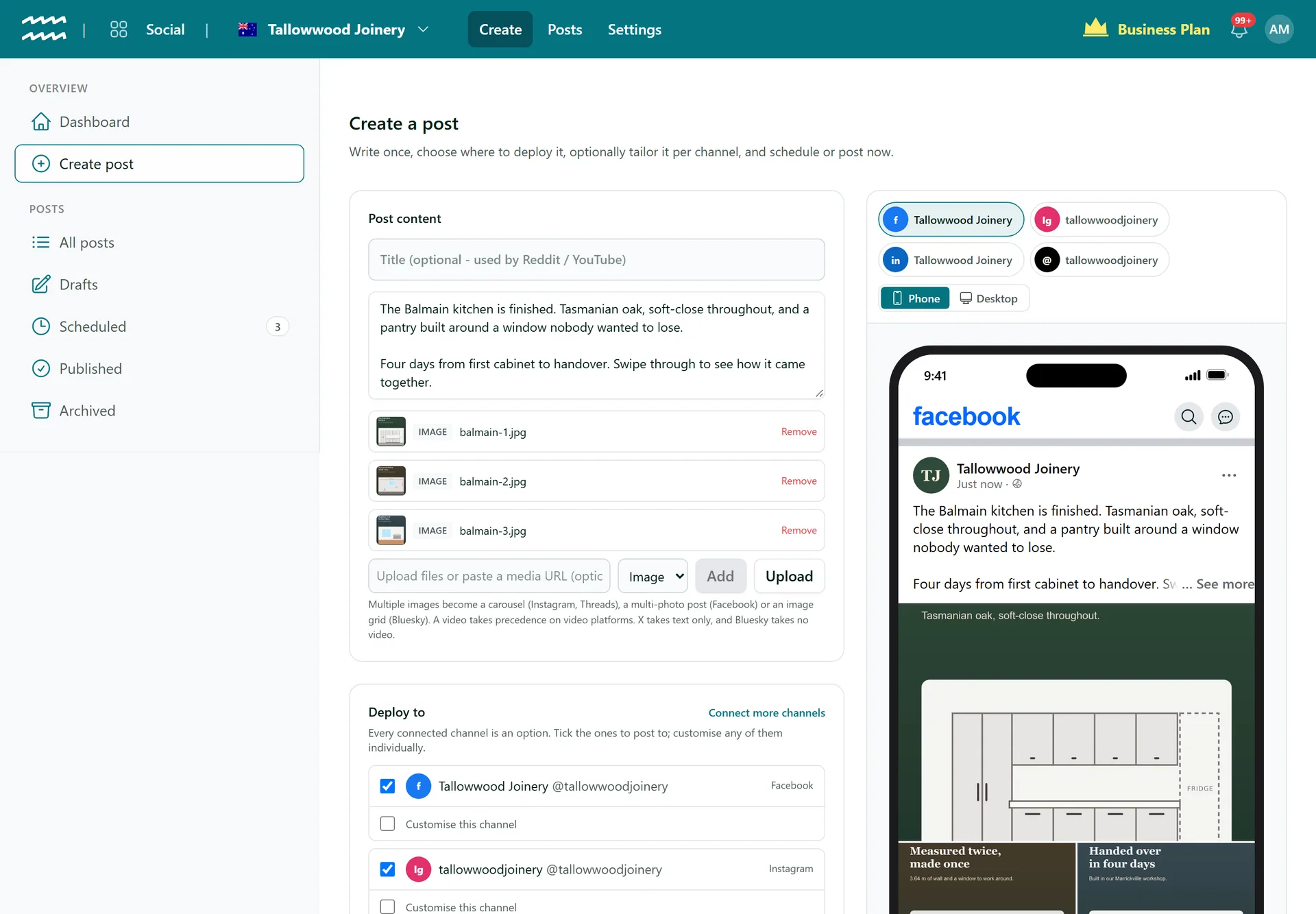
One post, written once
Write it once
Write the post once, then tick every connected channel it should go to.
Tailor any channel
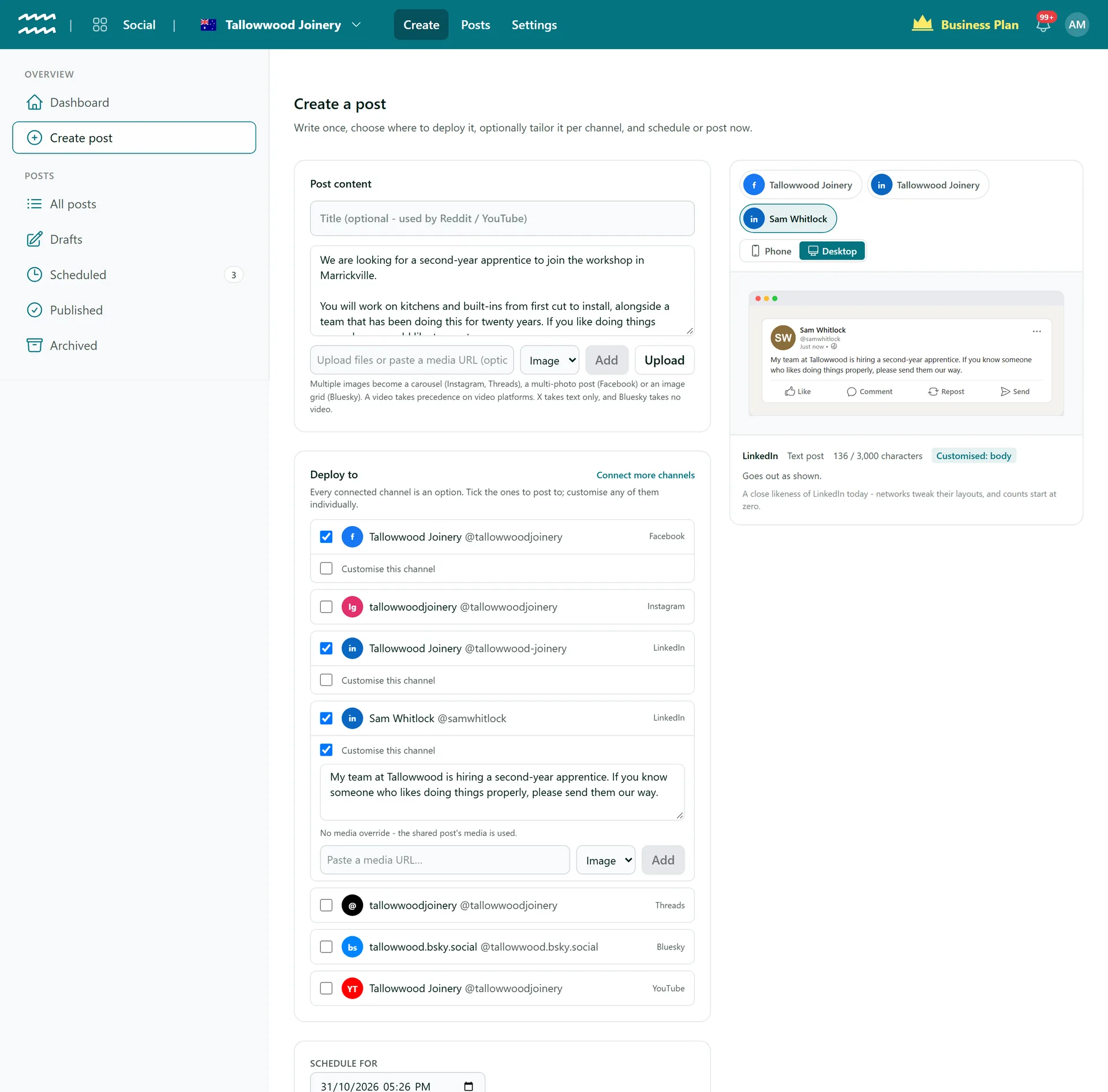
Tick Customise this channel to give one network its own text without touching the others.
Images and video
Upload files or paste a link. Several images become a carousel or a multi-photo post where the network supports it.
Limits checked
Each channel shows your character count against that network's limit, so a long post is caught before it goes.
Warned about media
If a network cannot carry your media, such as a video on Bluesky, the composer tells you that channel will fail.
Pages and profiles
LinkedIn can hold your personal profile and your company pages, each as its own channel.
How to post to several networks at once
- 1
Connect your channels
Open Settings, then Connections, and connect each account. Bluesky uses an app password; the others ask you to sign in.
- 2
Write the post
Choose Create post, write your text and add images or video.
- 3
Pick your channels
Under Deploy to, tick each channel. Use Customise this channel where you want different wording.
- 4
Send it
Choose Schedule, Post now or Save draft.
Change one network without changing the rest
A LinkedIn post can sound like the company while the same news sounds like you on your own profile. Anything you leave blank uses the shared post.
- Each channel can have its own text
- YouTube and Reddit can have their own title
- Reddit gets a toolbar for bold, lists and links
More in AirSign Social
True Previews
See how a post will look on each network before it goes.
Learn moreSchedule Ahead
Set a date and time and let the post go out on its own.
Learn morePost Status and Reconnects
See which networks published, then fix and retry the rest.
Learn moreCarousels and Video
Carousels, multi-photo posts, Reels and video, per network.
Learn moreYouTube Uploads
Upload to YouTube with a title, tags and visibility.
Learn moreLinkedIn Company Pages
Schedule posts to the company pages you manage.
Learn moreDraft vs Publish
Let people draft posts without being able to publish them.
Learn moreCompose Once FAQs
Facebook Pages, Instagram business accounts, LinkedIn, Threads, Bluesky and YouTube. X, Reddit and TikTok are built but show as Coming soon in Connections for now.
Each Facebook connection links one Page, the first one Facebook returns for your login. Instagram links one business account attached to a Page. LinkedIn can hold your profile and several company pages.
Yes, by pasting a link to the image under Customise this channel. Uploading files works on the shared post only.
JPG, PNG, WebP, GIF, MP4, MOV and WebM, up to 250MB a file.
No, there are no AI captions in AirSign Social. It also does not post to Pinterest or Google Business Profile.
No. AirSign Social writes, schedules and publishes. There are no analytics and no inbox, so engagement and replies stay on each network.
AirSign Social is part of the AirSign suite - one plan, every app. Book a demo and we will walk you through it.
Keep every channel active, without the busywork
Book a demo and see your next post previewed on every network.