Policy acknowledgement software that shows who has signed
Writing a policy is the easy part. Read & sign turns a wiki page into a signing document, and a requirement sends it to the right staff, reminds them and tracks who is up to date.
Book a demoPart of the AirSign suite - one plan, every app.
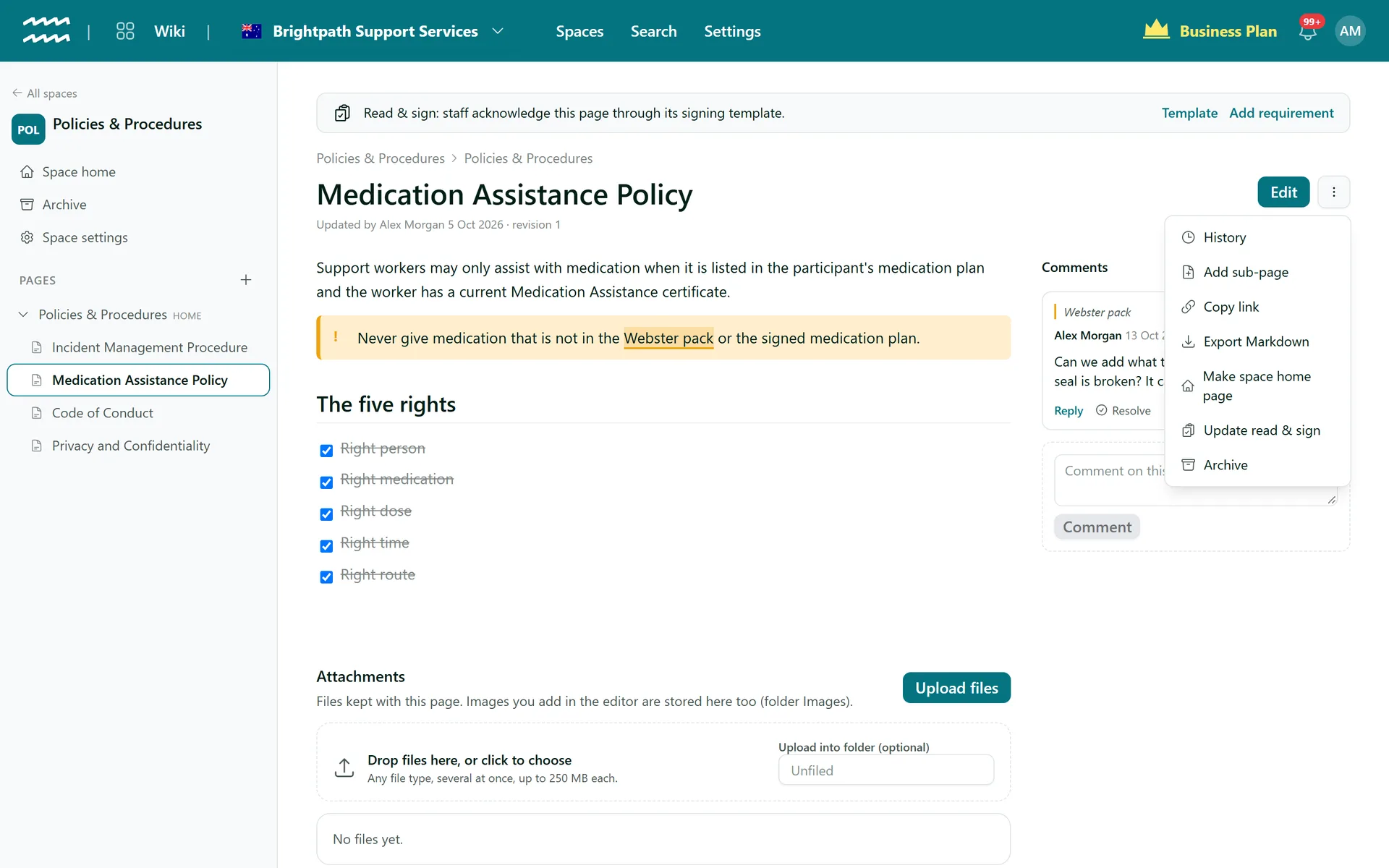
From published policy to signed record
Built from the page
The text of the page becomes a signing template, so there is nothing to retype.
Names the revision
Readers sign to say they read and understood that page at that revision number.
Sent by role or location
Scope the requirement by role, engagement type, location or tag, or leave it open to everyone.
Tracked like any requirement
See who is compliant and who is missing it, next to their other required documents.
Re-read on a schedule
Give the requirement a renewal cadence, so a policy is signed again each year.
Warned when it goes stale
Edit the page and a banner says the signing document is behind, with an Update button.
How to get a policy acknowledged
- 1
Create the document
On the page menu, choose Read & sign (Compliance), then Create. Nothing is sent yet.
- 2
Set up a requirement
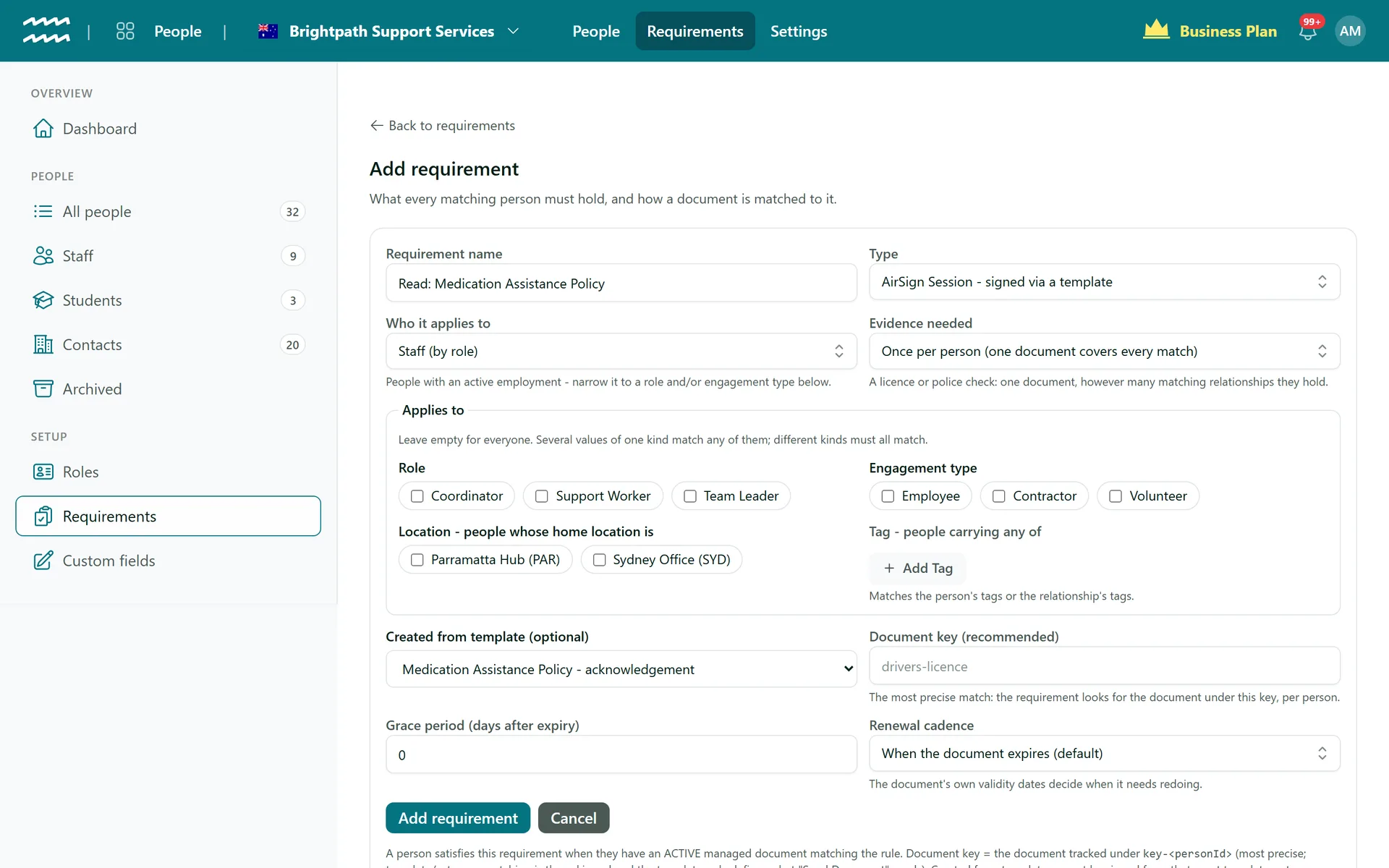
Choose Set up a requirement. The name and signing template are filled in for you.
- 3
Choose who must sign
Pick roles, locations or tags, set any renewal cadence, then choose Add requirement.
- 4
Send it
In People, under Requirements, choose Send to everyone missing, check the count and confirm.
Choose exactly who has to sign
Read & sign uses the same requirements as your licences and agreements. Several values of one kind match any of them, and different kinds must all match.
- Role, engagement type, home location and tag
- A grace period after expiry if you want one
- Renew a fixed period after signing, or by calendar period
More in AirSign Wiki
Company Wiki Editor
Write procedures with tables, checklists, callouts and diagrams.
Learn moreKnowledge Base Spaces
Spaces, home pages and page trees you can drag into order.
Learn morePolicy Version Control
Every save kept, with who, when and what changed.
Learn moreKnowledge Base Search
Search titles and text across every space you can see.
Learn morePolicy Acknowledgement FAQs
Choose Update on the page banner. A new template is built from the current revision, requirements switch to it and the old template is archived. With no document key on the requirement, everyone must sign again. With a key, existing acknowledgements stand until they expire.
No. Update changes what will be sent. Use Send to everyone missing to send it out.
All of the page text. Tables, quotes and code become plain paragraphs, and images are left out, with a warning so you know.
Yes. A page that needs more than 480 document blocks is refused rather than cut short, and you are asked to split it into shorter pages.
No, signing records that they say they read it. To test understanding, send a module with a quiz in AirSign Training.
AirSign Wiki is part of the AirSign suite - one plan, every app. Book a demo and we will walk you through it.
Give your team one place for how things are done
Book a demo and we will set up your first space with you.