SharePoint Integration
Signed documents are automatically saved to your SharePoint document libraries. Keep everything organised in one place without manual uploads.
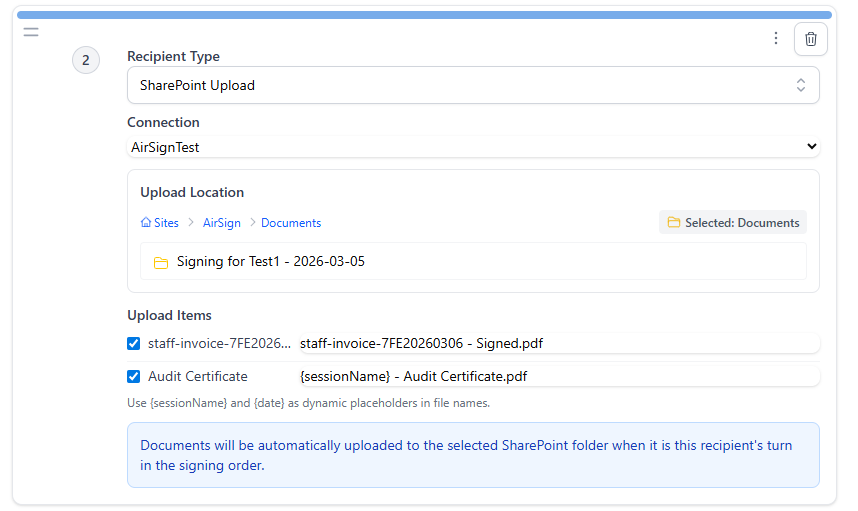
Signed Documents, Straight to SharePoint
The AirSign SharePoint integration automatically uploads completed documents to your SharePoint document libraries once signing is finished. No manual downloads, no re-uploads - signed files appear in SharePoint ready for your team.
Automatic Upload
Once all parties have signed, the completed document is automatically uploaded to your chosen SharePoint library. No manual steps required.
Organised Storage
Choose which SharePoint site and document library signed files are saved to. Keep your signed documents alongside related files in your existing folder structure.
Version History
Uploaded documents maintain SharePoint version history, giving your team a clear audit trail of every signed document.
How It Works
Connect SharePoint
Link your Microsoft 365 account to AirSign with a few clicks. Choose which SharePoint site and library to save to.
Send Documents as Usual
Upload and send documents for signing through AirSign as you normally would. Nothing changes in your signing workflow.
Recipients Sign
Recipients receive a signing link via email and sign from any device. No account or software needed.
Uploaded to SharePoint
Once signing is complete, the signed document is automatically uploaded to your SharePoint library.
Who Benefits from This Integration
Teams with Shared Libraries
Teams that manage shared document libraries in SharePoint get signed copies uploaded automatically without disrupting their existing folder structure.
HR Departments
HR teams using SharePoint get signed onboarding documents, employment contracts, and policy acknowledgements uploaded automatically to the right library.
Legal Teams
Legal teams with contract repositories in SharePoint get signed agreements uploaded directly to their libraries, keeping version history intact.
Benefits
No Manual Uploading
Signed documents are uploaded to SharePoint automatically. No need to download the signed file and manually re-upload it to your document library.
Centralised Document Storage
Keep all your signed documents in one place. Completed files land in your chosen SharePoint library, so your team always knows where to find them.
Works with Existing Permissions
AirSign respects your existing SharePoint permissions. Users can only access and send documents they already have permission to view in SharePoint.
Microsoft 365 Compatible
Works seamlessly with your existing Microsoft 365 subscription. Connect with SharePoint Online and integrate into the tools your organisation already uses every day.
Ready to sign documents from SharePoint?
Connect AirSign to your SharePoint document libraries and streamline your signing workflow. Start your free trial today.